
*and any compatible software
Gradient Smithy 1.1

Gradient Smithy allows, among others, to realize what photoshop calls gradient map effect. Clearly, the plugin uses any gradient to associate to every level of luminosity a colour. Furthermore, Gradient Smithy allows to create first complex gradients, quite easily.
New in version 1.1: Better compatibility for Vista/Win 7 users. You shouldn't get anymore an error related to "File access" when UAC is enabled.
Example: to illustrate the gradient map effect.
| Before | After |
|---|---|
 |
 |
And now, we are going to study the plugin's interface.
 From a fundamental point of view the plugin possesses two totally separated modes: creation mode and application mode .
Creation mode
Mode creation is mode by default. In this mode very few options are available. Even the OK button is missing! In fact, everything happens in the preview window.
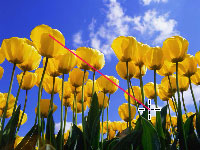

In the preview window, drag across the colors you want to sample. The sample begins where you click and ends where you release. During the drag, a gradient preview is displayed in real time!
From creation mode to application mode
When you go into the application mode, the plugin possesses in memory, the gradient you just have created. If it is not the case, the plugin automatically proposes one.

- At this stage you have four possibilities:
- To retouch the gradient: gaussian blur, contrast, offset etc ...
- To save (in .gds format) the last gradient in memory.
- To load in memory another gradient (in .gds format).
- To see and to apply the "gradient map" effect. ( The OK button comes back).
From application mode to creation mode
When you return in the creation mode, the last gradient in memory is lost! So be careful, and save your work ...
This plugin interests you? Click the link below.